What is SSL?
SSL (Secure Sockets Layer), or TLS (Transport Layer Security), is a security technology that encrypts information on the internet. Used in combination with an SSL server certificate, it can prevent eavesdropping, tampering, and impersonation by third parties.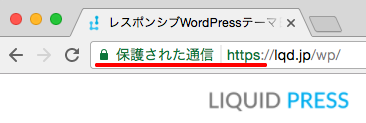 On an SSL-enabled site, the URL becomes HTTPS and a padlock icon appears in the browser's address bar.
Why is SSL necessary?
Security measures
As a security measure, SSL support with encrypted communication is recommended. It has long been considered especially important for contact forms where personal information is entered, membership sites, e-commerce sites, and the like, but today always-on SSL, which enables SSL on all other pages as well, is recommended.Browser warnings
From 2017, Google Chrome (version 56) began showing a security warning when entering a password on a non-SSL (unencrypted) site. Then in 2018, Google Chrome (version 68) began showing "Not secure" in the address bar of all unencrypted sites. In 2019, Safari on iOS (version 12.2) began showing "Not Secure" in the address bar of all unencrypted sites.

SEO
Google advocates "HTTPS everywhere" and has announced that HTTPS support is reflected in search rankings.However, its weight is not as great as other signals, such as high-quality content.
Official Google Blog: HTTPS as a ranking signal
Improved display speed
Many browsers support the next-generation protocol "HTTP/2" for HTTPS communication. HTTP/2 is a communication standard that optimizes requests for images, CSS, JavaScript, and more, which can be expected to speed up display. Supporting HTTP/2 can therefore also improve display speed.Advantages and disadvantages of enabling SSL
Advantages of enabling SSL
- Stronger security through encrypted communication
- Greater trust through proof of your organization's existence and other attributes
- Alignment with Google's policy (SEO)
- Improved display speed through HTTP/2
Disadvantages of enabling SSL
- Increased costs, including management costs (SSL certificate fees and renewal fees)
- Some browsers do not support SSL
SHA-2: Windows XP SP2 and earlier, feature phones
SNI: below IE 7 (Windows XP), below iOS 4.0, the standard browser below Android 3.0, feature phones
Types of SSL
Types of validation levels
| DV / domain validation | OV / organization validation | EV validation | |
|---|---|---|---|
| Encryption | ◯ | ◯ | ◯ |
| Eligible applicants | Individuals and organizations | Organizations | Organizations |
| Trust level | Low | Medium | High |
| Price | Low | Medium | High |
| Characteristics | Fast issuance | Can prove the organization's existence | The most rigorous validation method; the address bar turns green and the company name is displayed |
Types of certificates
| Domain certificate | One certificate per domain name (FQDN) |
|---|---|
| Wildcard certificate | A certificate covering multiple subdomains, such as "www1.example.com" and "www2.example.com" |
| Multi-domain certificate | A certificate covering multiple domains, such as "www.example1.com" and "www.example2.com" |
SSL-capable servers
| Rental server | SSL support |
|---|---|
Sakura Rental Server

| Light plan and above, certificate free of charge |
Lolipop!

| Light plan and above, certificate free of charge |
| "Xserver Business", a rental server for corporate customers | Free custom SSL, certificate free of charge Pricing plans, sign up |
Please check the service details carefully, including the SSL validation level, the type of certificate, and whether it is custom SSL or shared SSL.
How to enable SSL on WordPress (new sites)
WordPress settings
From WordPress admin screen > Settings > General, set the following to "https://...".- WordPress Address (URL)
- Site Address (URL)
How to enable SSL on WordPress (migration)
Plugin: Really Simple SSL
To enable SSL on an existing WordPress site, the plugin "Really Simple SSL" is convenient. It makes it easy to change the general settings, change links within existing posts, set up redirects from old URLs in .htaccess, and more.*For details about the plugin, please check the plugin's documentation and similar resources.
Reconfiguring the Customizer
If you have uploaded and configured images such as a logo or slideshow images under Admin screen > Appearance > Customize, you will need to configure them again. The image URLs change from HTTP to HTTPS.Other settings
In addition, all files must be loaded over HTTPS. If even one file is loaded over HTTP, the padlock icon will not appear in the browser. Please check the settings of external services and WordPress plugins.Also, change your site information to HTTPS in tools such as Google Search Console.
What to do when you cannot enable SSL on WordPress
Depending on the specifications of your rental server, WordPress core may be unable to detect SSL internally, which can cause problems.Settings for a dedicated plugin or similar may be required, so please refer to your rental server's manual.
Notes on SSL support
- Regarding enabling SSL, please carefully check the specifications and configuration methods of the services you use.
- Please confirm in advance whether your WordPress theme and plugins support SSL.
- Enabling SSL is outside the scope of setup support. If you would like a quote for SSL support, please feel free to contact us.
The LIQUID PRESS series supports SSL
LIQUID PRESS series themes support SSL, so you can use them with confidence.LIQUID PRESS
 » Unlimited Plan
» All Themes
» Unlimited Plan
» All Themes