WordPress Theme Setup Support
LIQUID PRESS SUPPORTAbout Setup Support
As themes registered in the official WordPress list of "commercially supported GPL themes", LIQUID PRESS themes come with private setup support.If you have any questions about installing or configuring LIQUID PRESS, please contact us via the setup support form.
We handle more than 250 support cases per year.
Professional Support (by email / no time limit)
If you are on a subscription plan with unlimited use of themes and plugins, you also receive professional support (by email / no time limit).If you would like ongoing support or professional support, please use a subscription plan.
Manuals and FAQ
We also provide theme setup manuals and a FAQ, so please check these first.A PDF manual is also included under WordPress Admin > Appearance > Theme Support, so please take a look. * This requires setting your license ID under Admin > Appearance > Customize.
Scope of Support
| Setup support | Professional support | |
|---|---|---|
| Support period | 30 days after purchase | No time limit |
| Individual private email support | Yes | Yes |
| Support for configuring LIQUID PRESS (Appearance > Customize) | Yes | Yes |
| Support for issues with LIQUID PRESS | Yes | Yes |
| Support for how to update LIQUID PRESS and what is in each update | Yes | Yes |
| Introductions to LIQUID PRESS services and events | Yes | Yes |
| Support for customizing LIQUID PRESS and for child themes (*) | No | Yes |
| Support for configuring WordPress core in relation to LIQUID PRESS (general appearance settings, etc.) | No | Yes |
| Provision of past versions of LIQUID PRESS | No | Yes |
| Provision of LIQUID PRESS extensions | No | Yes |
| Provision of LIQUID PRESS premium patterns | No | Yes |
| Support for free LIQUID PRESS plugins | No | Yes |
What We Cannot Do
- Phone or chat support
- Support for WordPress core, server configuration, or HTML/CSS/PHP
- Support for issues with WordPress core, third-party themes, or plugins
- Creating designs, images, code, and the like
* We may not be able to write or provide specific code.
* If template modifications or actual work on our part are required, we will provide a separate quotation.
* Setup support is not available for the free official themes or the free trial themes.
* We do not provide support for installing or updating WordPress core, multisite configuration, and the like.
* We do not provide support for the free LIQUID PRESS design skins and parts.
* LIQUID PRESS showcase pages, case study sites, and external sites where LIQUID PRESS is featured may have been customized. Please always verify the theme's features and specifications on the official demo site.
Other Services
We also offer customization, theme production, design, setup services, maintenance and operations, and marketing support for an additional fee,
so if you would like to discuss the details, we will be happy to provide a quotation.
Discounts are available for customers on a subscription plan.
Before You Contact Us
Points to Check
- Please always contact us via the setup support form below.
- Please always include: [1] your order number
[2] your WordPress core version
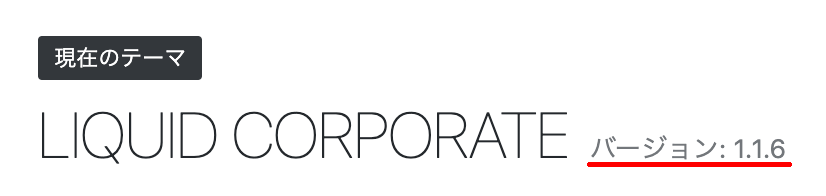
[3] your theme version. - To begin with, please review the FAQ, the setup manual, and the customization manual.
- In many cases, a plugin is the cause of the problem. Please deactivate all plugins temporarily and check the behavior.
- Please describe your browser, the error, and other details as specifically as possible. If the details are unclear, we may not be able to reply.
- WordPress core, server configuration, plugins, and HTML/CSS are outside the scope of our support.
- If you have several questions, it is quickest to send them together in one message.
- If investigation is required, our reply may take some time.
- It may take some time (2-3 business days) for us to reply. During weekends, public holidays, Golden Week, the summer break, and the year-end/New Year holidays, we will reply after the break ends. Thank you for your understanding.
How to Check Your WordPress Core Version
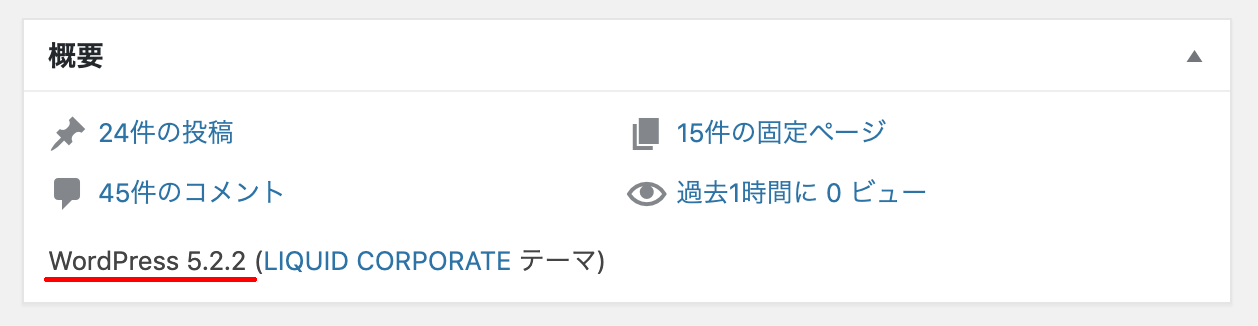
Please check under Admin > Dashboard > At a Glance.
How to Check Your Theme Version
Please check under Admin > Appearance > Theme Details.