Here we introduce how to speed up WordPress and improve your PageSpeed Insights load speed.
The LIQUID PRESS series themes are actively working on improving load speed.
Why Speeding Up WordPress Matters
Better User Experience
Users place great importance on how quickly a web page loads.Google's research has published some interesting data, such as the following.
- The average time it takes for a mobile landing page to fully load is 22 seconds
- If a mobile site takes more than 3 seconds to load, 53% of visitors abandon it
- When load time goes from 1 second to 6 seconds, the bounce rate rises by 106%
This shows that user experience and load speed also affect a site's abandonment and bounce rates.
As an SEO Measure
Google uses page load speed as a ranking factor in both desktop and mobile search. In other words, pages that load quickly have an advantage in Google search result rankings.Note that many other factors also determine search rankings.
Reference: Using page speed in mobile search ranking
PageSpeed Insights
PageSpeed Insights is a service provided by Google that measures the load speed of web pages. By using this service, you can check the load speed of your own site. You can also see suggestions for improving load speed.» PageSpeed Insights
How to Use It
In PageSpeed Insights, enter your site's URL and click the "Analyze" button.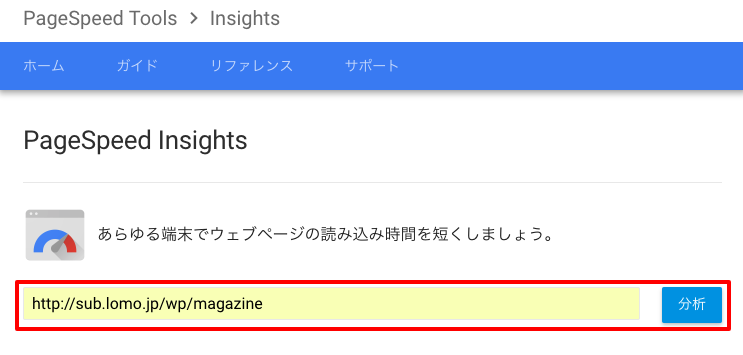 Optimization scores are displayed for loading on mobile and for loading on desktop.
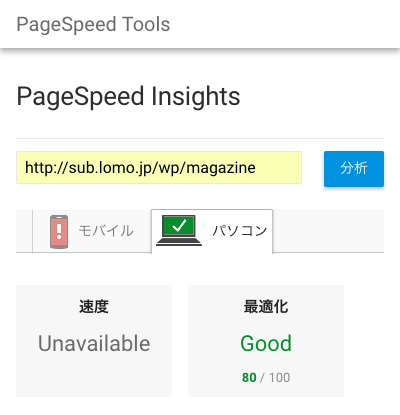 *Google made changes to PageSpeed Insights in January 2018.
It now shows actual speed performance, but in some cases it shows "Unavailable" and is not displayed.
*Google made changes to PageSpeed Insights in January 2018.
It now shows actual speed performance, but in some cases it shows "Unavailable" and is not displayed.
How to Improve Load Speed
For each optimization suggestion, clicking "Show how to fix" displays specific improvement steps. Here we introduce several improvement methods in concrete terms.
Optimize Images
This is a suggestion about optimizing image sizes. The fix instructions show how much size can be saved.
1. Compress Images
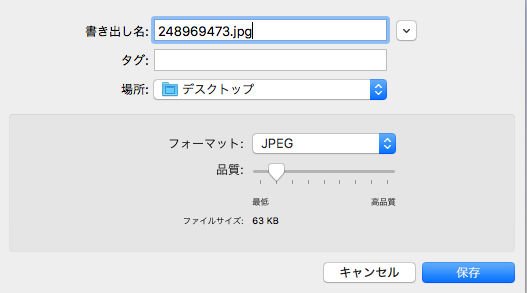
Compress images to reduce their file size.On a Mac, you can open an image in Preview and compress it from File > Export. Adjust the "Format" and "Quality". JPEG is suitable for photographs, and PNG for simple images.
Moving the quality slider lets you check the resulting file size.
2. Change Image Dimensions
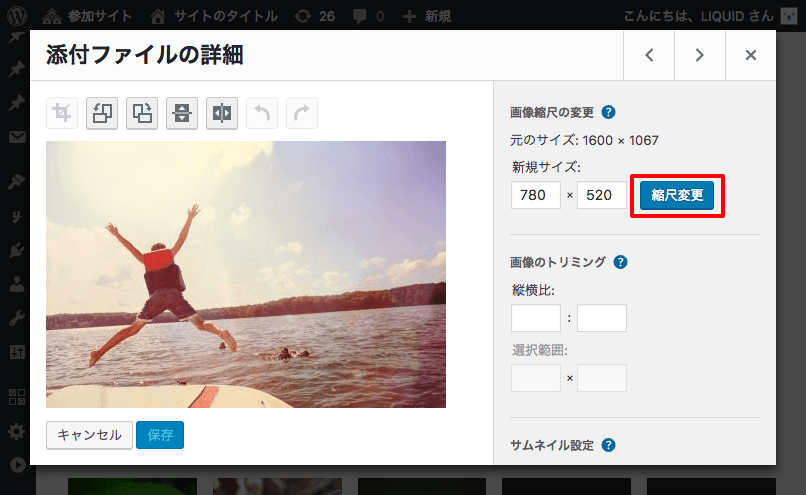
For example, a high-resolution photo taken with a DSLR may be more than 5,000px wide, but a web page does not need anything that large.With LIQUID PRESS themes, a minimum width of 780px is enough for an attractive display.
For images already uploaded to WordPress, you can change the size from Dashboard > Media > "Edit Image". Enter the size, click "Scale", and save.
3. Use an Image Compression Plugin
If handling this manually as described above is troublesome, you can compress images using a WordPress plugin.WordPress Plugins
- EWWW Image Optimizer: supports lossless compression. Newly uploaded images are compressed automatically.
- Compress JPEG & PNG images: the plugin version of the well-known image compression service "TinyPNG". There is a monthly limit on the number of images compressed.
4. Use the PageSpeed Insights Resources
At the end of the suggestions screen there is a link reading that you can download optimized image, JavaScript, and CSS resources for this page.Clicking it lets you download the optimized images and other assets as a ZIP file.
5. Use Lazy Loading for Images
Lazy loading is a method in which images are loaded when they need to be displayed, as the user scrolls the screen. Because it reduces the number of images loaded on arrival, you can expect shorter display times.WordPress Plugins
- Lazy Load: a WordPress plugin that supports lazy loading of images.
Eliminate render-blocking JavaScript and CSS in above-the-fold content
This is a suggestion about how JavaScript and CSS are loaded.You can speed things up by reducing the number of files loaded and by improving where they are loaded.
1. Use a WordPress Theme That Already Addresses This
For example, LIQUID PRESS series themes are simply designed, so they load few files, and files other than the main ones are loaded in the footer, so they do not block rendering.2. Tidy Up Your WordPress Plugins
Many WordPress plugins automatically load additional JavaScript and CSS as soon as they are activated.If there are plugins you do not normally use, deactivating them can bring improvements.
Leverage Browser Caching
This is a suggestion about cache settings for files on the web.You can edit .htaccess on the server to configure which files are cached and for how long.
.htaccess
Reference:<IfModule mod_expires.c> ExpiresActive On ExpiresByType text/css "access plus 1 days" ExpiresByType application/javascript "access plus 2 week" ExpiresByType application/x-javascript "access plus 2 week" ExpiresByType image/gif "access plus 3 week" ExpiresByType image/png "access plus 3 week" ExpiresByType image/jpg "access plus 3 week" ExpiresByType image/jpeg "access plus 3 week" ExpiresByType image/x-icon "access plus 3 week" ExpiresByType image/svg+xml "access plus 3 week" ExpiresByType application/vnd.ms-fontobject "access plus 3 week" ExpiresByType application/x-font-ttf "access plus 3 week" ExpiresByType application/x-font-woff "access plus 3 week" </IfModule>*Your server must support .htaccess and the relevant modules.
*Cache periods vary depending on how your site is operated, so please review them as appropriate.
Minify HTML/CSS/JavaScript
This is a suggestion about compressing files on the web.You can edit .htaccess to configure which files are compressed.
.htaccess
Reference:<ifModule mod_deflate.c> <IfModule mod_filter.c> AddOutputFilterByType DEFLATE text/plain AddOutputFilterByType DEFLATE text/html AddOutputFilterByType DEFLATE text/xml AddOutputFilterByType DEFLATE text/css AddOutputFilterByType DEFLATE application/xml AddOutputFilterByType DEFLATE application/xhtml+xml AddOutputFilterByType DEFLATE application/rss+xml AddOutputFilterByType DEFLATE application/javascript AddOutputFilterByType DEFLATE application/x-javascript AddType image/svg+xml svg svgz AddType application/vnd.ms-fontobject eot AddType application/x-font-ttf ttf AddType application/x-font-woff woff AddOutputFilterByType DEFLATE image/svg+xml svg svgz AddOutputFilterByType DEFLATE application/vnd.ms-fontobject AddOutputFilterByType DEFLATE application/x-font-ttf AddOutputFilterByType DEFLATE application/x-font-woff </IfModule> </ifModule>*Your server must support .htaccess and the relevant modules.
Other Improvement Methods
- Disable the infinite scroll plugin
This reduces the amount of content, so improvement can be expected. - Reduce the number of articles displayed per page
This reduces the amount of content, so improvement can be expected. - Remove Facebook/Twitter and similar embeds
This reduces external JavaScript and CSS, so improvement can be expected. - SSL (HTTPS) support
This enables the next-generation HTTP/2 protocol, so faster display in the browser can be expected. - Use your server's caching features
- Use caching plugins
Improvement Results on Our Demo Site
Here we present the PageSpeed Insights measurement and improvement results for the LIQUID PRESS demo site.» LIQUID MAGAZINE demo site
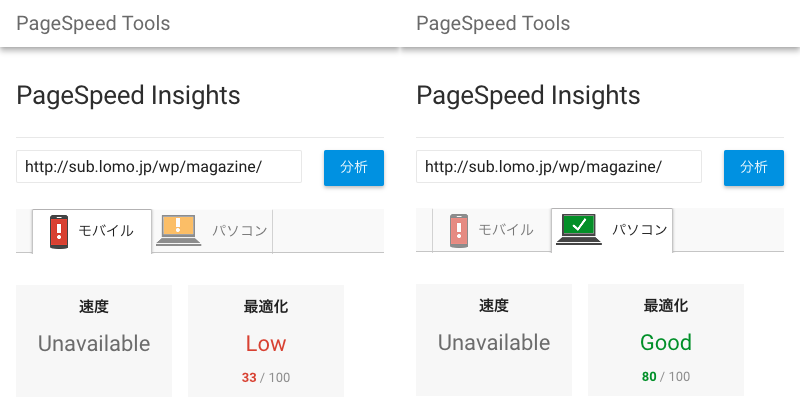
Before Load Speed Improvements
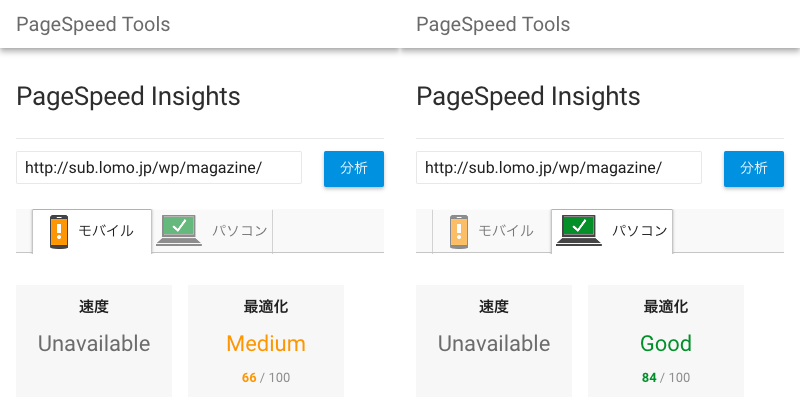
After Load Speed Improvements
Summary
We analyzed the web pages with PageSpeed Insights and improved the demo site by following its suggestions.- On mobile, the score improved from Low (33) to Medium (66).
- On desktop, the score improved from Good (80) to Good (84).
What We Improved
- .htaccess settings
- Changed image dimensions (780px wide)
- Compressed images
- Tidied up WordPress plugins
- Disabled the infinite scroll plugin
- Updated LIQUID PRESS (0.9.7.4)
Please Note
- The test results above are from the time of testing. Because the demo site exists to demonstrate the WordPress theme, some settings have been reverted to their pre-improvement state.
- PageSpeed Insights optimization scores vary depending on a wide range of conditions. We do not guarantee any score.
- Many factors determine Google search result rankings. We do not guarantee any ranking.
- We do not guarantee the operation of WordPress plugins.
- PageSpeed, server settings, and plugins are outside the scope of support.
LIQUID PRESS Load Speed Improvement Measures
LIQUID PRESS series themes are actively working on improving load speed.Please update to the latest version before use.
Recent Improvements
- Moved JS file loading position to the footer #164
- Adjusted the retrieved size of featured images #166
Related Articles
- LIQUID PRESS theme features (Responsive Plus support)
- About support for the Google Mobile-First Index (MFI)
- Speeding up WordPress with the Lolipop! "content cache feature"
LIQUID PRESS
 » Unlimited Plan
» All Themes
» Unlimited Plan
» All Themes